
SMS opt-in evidence
Effective date: September 29, 2026 · Messages are sent by SiteMaster (Master Construction Solutions, Inc.).
SiteMaster can text you when something on your project needs an answer — a punch item to close out, a delivery window that moved, an RFI waiting on you. You choose whether to receive them. This page shows the screens where that choice is made, the exact words on them, and what you agree to.
Consent is collected directly from the person who owns the mobile number, on a screen where the number and the checkbox sit together. Nobody can opt in on your behalf, and you are never asked to send us a text message in order to opt in.
The screens, as users see them
Full-screen captures of the live pages. Each is hosted on sitemaster.work at the address under it.
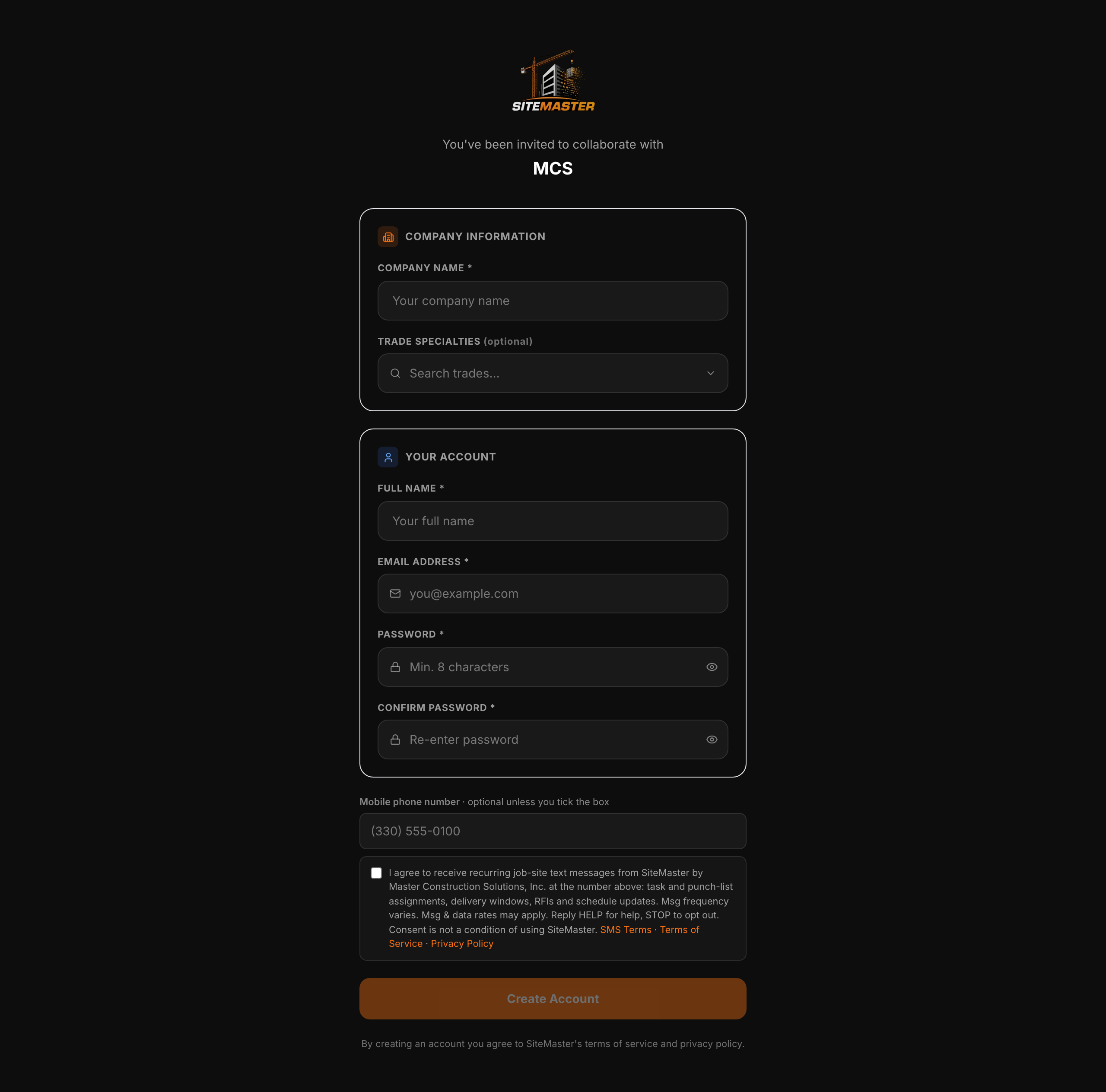
Web app → Activate account → Profile step
The mobile number field with the consent box below it, unchecked. The person enters their own number and ticks the box themselves. The same block appears on the emailed account-activation screen and the crew sign-up screen.
sitemaster.work/sms-consent/web-signup-unchecked.png
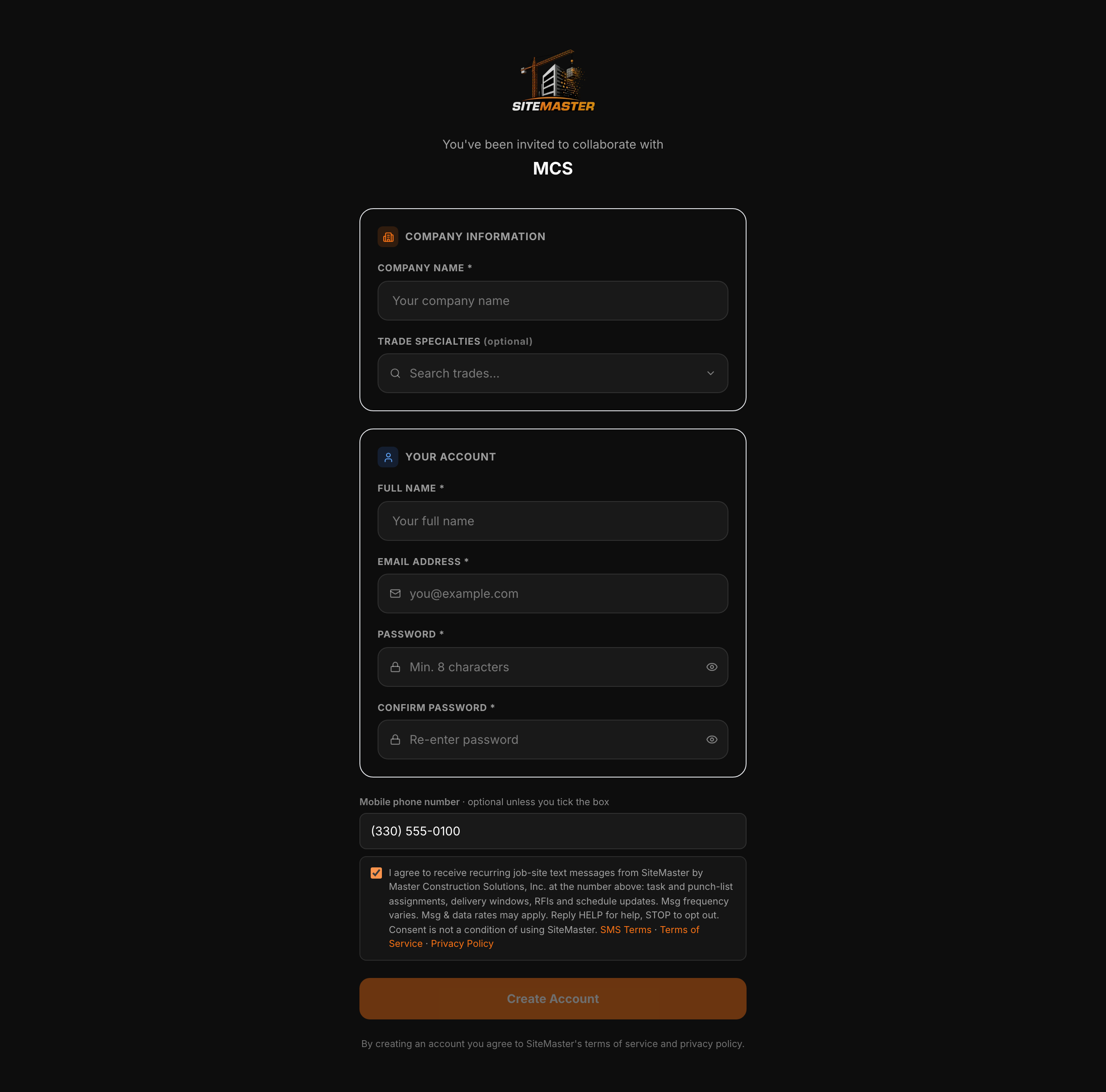
Web app → Activate account → Profile step, box ticked
The same screen after the person has entered a number and ticked the box. Nothing is pre-ticked; ticking the box makes the number required.
sitemaster.work/sms-consent/web-signup-ticked.png
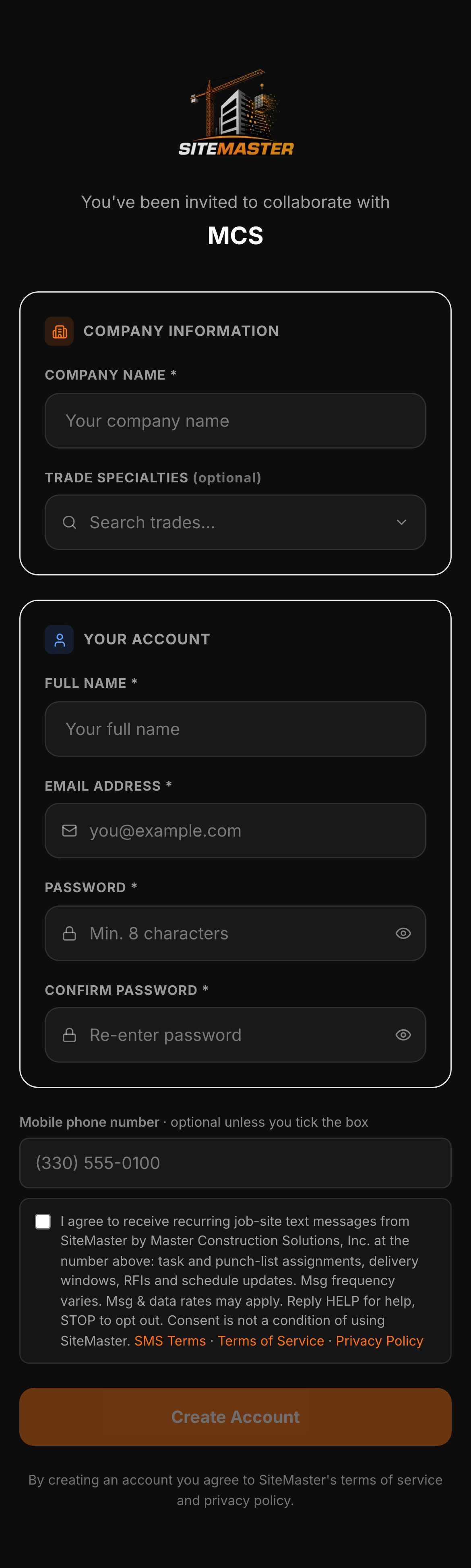
iPhone → the same account screen
The account screen on an iPhone (Safari): number field and consent box on one screen.
sitemaster.work/sms-consent/iphone-signup.png
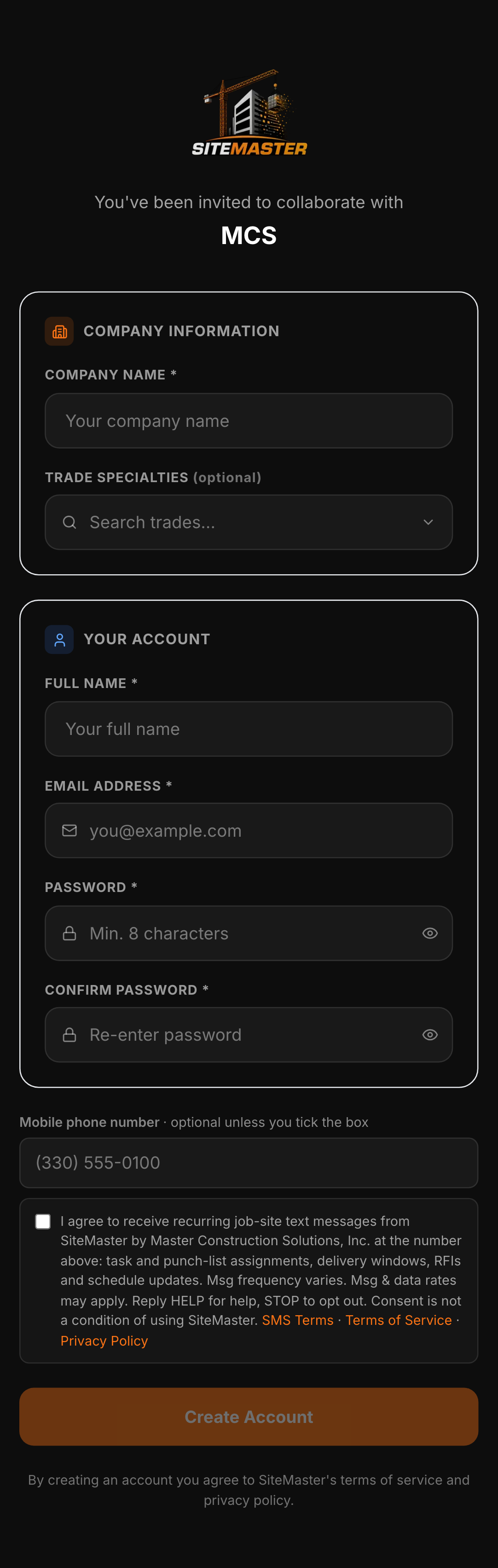
Android phone → the same account screen
The account screen on an Android phone (Chrome): number field and consent box on one screen.
sitemaster.work/sms-consent/android-signup.png
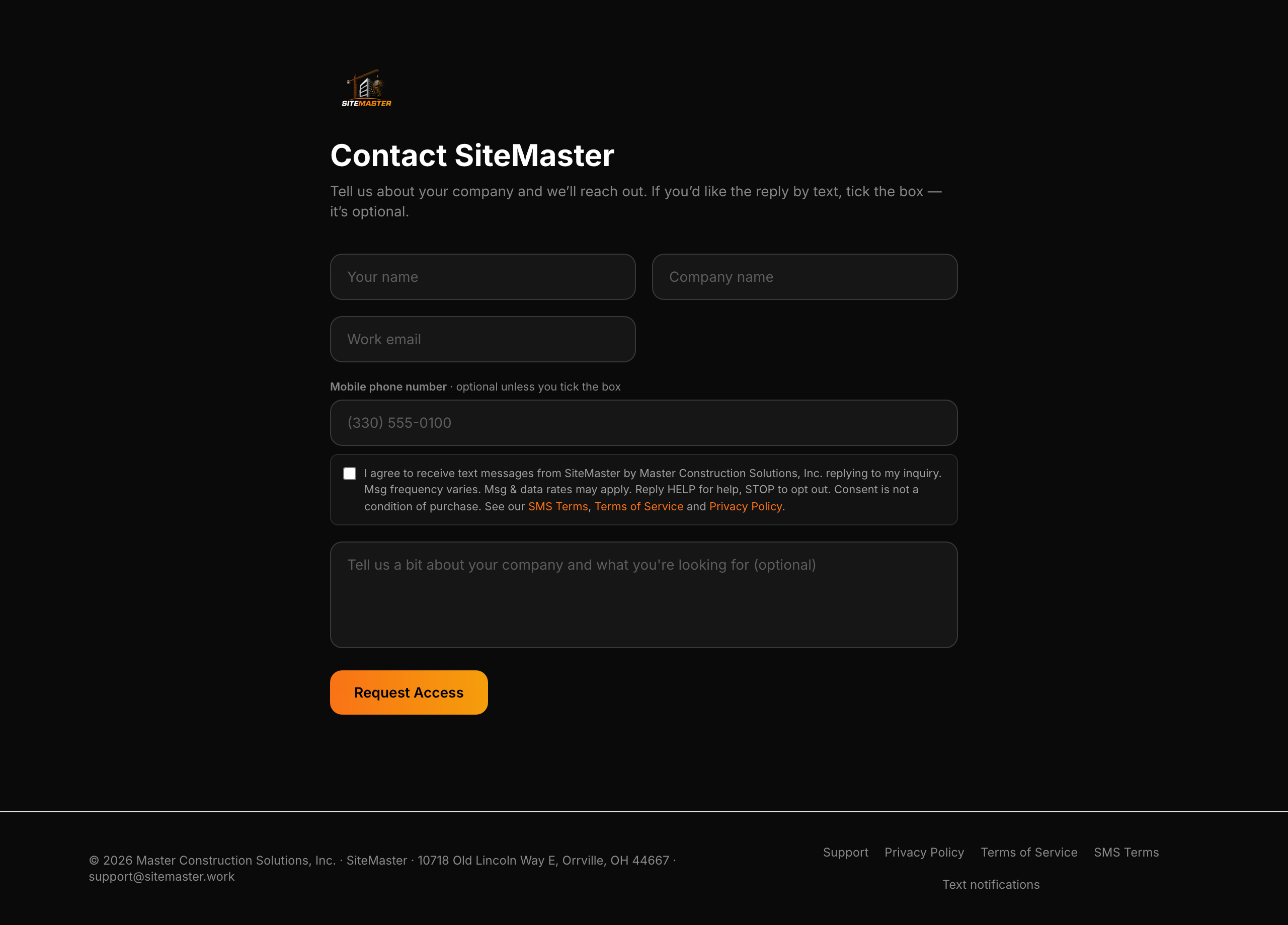
sitemaster.work/contact → the inquiry form
The website contact form: a visitor may tick a separate, unchecked box to receive the reply by text.
sitemaster.work/sms-consent/contact-form.png
SiteMaster
Text Message
The confirmation text, on a phone
The message a person receives once, right after opting in. Drawn here from the same text the system sends, so the words on this page and the words on the phone are one and the same.
sitemaster.work/sms-opt-in/confirmation
The exact words on each path
1. Account activation and sign-up (web app and mobile)
Shown with the mobile number field directly above it; unchecked until the person ticks it.
“I agree to receive recurring job-site text messages from SiteMaster by Master Construction Solutions, Inc. at the number above: task and punch-list assignments, delivery windows, RFIs and schedule updates. Msg frequency varies. Msg & data rates may apply. Reply HELP for help, STOP to opt out. Consent is not a condition of using SiteMaster.”
2. Website contact form
A separate, unchecked box on the inquiry form. Try it: https://sitemaster.work/contact
“I agree to receive text messages from SiteMaster by Master Construction Solutions, Inc. replying to my inquiry. Msg frequency varies. Msg & data rates may apply. Reply HELP for help, STOP to opt out. Consent is not a condition of purchase.”
3. The confirmation text, sent once after opting in
“SiteMaster (Master Construction Solutions): You're opted in to SiteMaster job-site texts. Msg frequency varies. Msg & data rates may apply. Reply HELP for help, STOP to opt out.”
If your company adds you to a project
Being added to a project does not enable text messaging to your number. You receive an email invitation to activate your own SiteMaster account, and texts are enabled only if you personally tick the consent box during activation.
What to expect
- Messages. task and punch-list assignments; Delivery windows; RFIs waiting on you; Schedule changes; Job-site safety notices; Replies to inquiries you send through our website. No marketing or promotional texts.
- Frequency. Message frequency varies with your project activity and your notification settings.
- Cost. Message and data rates may apply. These are charged by your carrier, not by us.
- Stopping. Reply STOP to any message to opt out. You can also switch texts off in your account settings at any time.
- Help. Reply HELP, or email support@sitemaster.work.
Texts are optional. You can use every part of SiteMaster without them, and turning them off does not affect your account or your access to a project.
Your phone number and SMS consent are not shared with or sold to third parties for marketing. Full details are in our Privacy Policy and SMS Terms.
Who sends the messages
Messages are sent by SiteMaster (Master Construction Solutions, Inc.).
Master Construction Solutions, Inc.
10718 Old Lincoln Way E
Orrville, OH 44667, United States
support@sitemaster.work